Industrial Wayfinding Graphics for Manufacturing, Logistics, and Warehouse Facilities
Industrial wayfinding graphics help people make fast, safer decisions in facilities where forklifts, visitors, production teams, and inventory all move at once. In manufacturing plants, logistics hubs, and warehouses, floor markings, wall graphics, route identifiers, dock labels, and directional cues work together to reduce hesitation, reinforce site rules, and keep high-traffic spaces easier to navigate.
Need a wayfinding plan that fits live operations? Contact AP Installations to discuss durable industrial graphics for your facility.
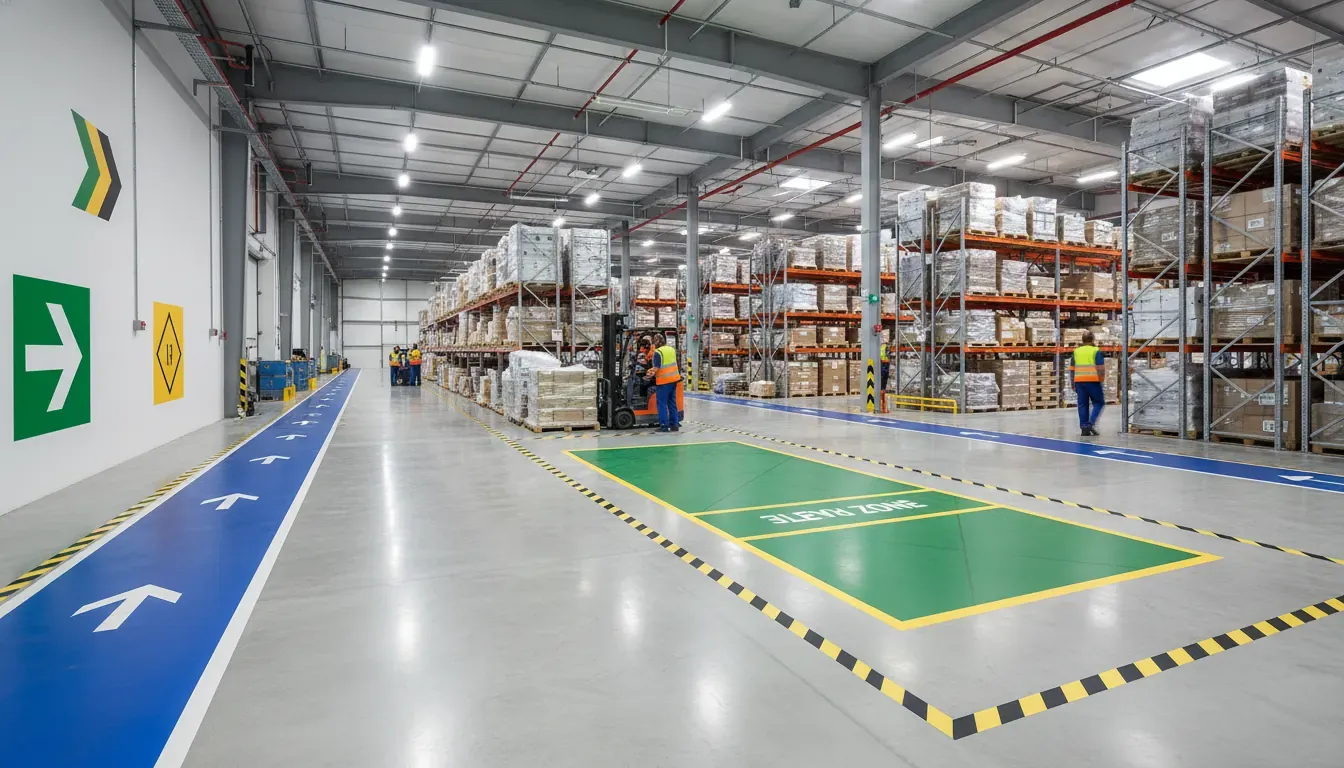
This guide is written for production directors, facility managers, EHS leaders, and operations teams that need graphics to do more than decorate a building. The goal is not simply to add arrows. The goal is to create a visual navigation system that supports traffic flow, visitor routes, staging areas, safety communication, and installation timing without creating avoidable downtime.
What are industrial wayfinding graphics?
Industrial wayfinding graphics are installed visual cues that help employees, drivers, vendors, and visitors understand where to go, what to avoid, and how a facility is organized. They can be applied to floors, walls, columns, doors, equipment-adjacent zones, docks, corridors, and visitor areas.
A complete system may include:
- Pedestrian lanes, crosswalks, forklift routes, and keep-clear zones
- Directional arrows, zone colors, dock numbers, and department identifiers
- Visitor path graphics from entry points to offices, observation areas, or required PPE zones
- Restricted-area notices, sanitation transitions, emergency route reinforcement, and equipment clearance reminders
- Wall graphics that stay visible when floor areas are temporarily blocked by pallets, carts, or cleaning activity
That mix matters because industrial navigation rarely happens on one plane. A floor arrow may tell a person where to walk, while a wall identifier confirms they reached the correct production zone. In busy facilities, redundancy can reduce wrong turns and repeated questions without relying on oversized freestanding signage.
Why wayfinding graphics matter in plants and warehouses
Production environments are judged by speed, consistency, and control. When movement patterns are unclear, small delays stack up. A vendor waits at the wrong entrance. A new hire crosses an active material path. A visitor pauses in a working aisle to find the next checkpoint. A forklift route overlaps with pedestrian shortcuts because the intended circulation pattern is not obvious.
Industrial wayfinding graphics help facilities address those friction points in a visible, repeatable way. Well-planned graphics can:
- Clarify pedestrian, forklift, and visitor circulation
- Make department boundaries, restricted areas, and staging zones easier to recognize
- Support training by turning verbal instructions into visual cues
- Improve consistency across shifts, buildings, and multi-site rollouts
- Make audits, tours, and vendor visits easier to manage
AP Installations already addresses related safety communication in its warehouse safety graphics installation guide. Wayfinding sits beside that effort, but the intent is broader: it connects movement, orientation, site logic, and communication across the facility.
Where should industrial wayfinding graphics go?
The best placements reflect actual movement, not a generic sign package. Before choosing materials or colors, map who moves through the building, when they move, and where confusion or conflict happens.
Entrances, lobbies, and visitor checkpoints
Wayfinding begins before someone reaches production. Exterior entry cues, reception identifiers, visitor parking guidance, and check-in route graphics reduce uncertainty for guests who do not know the building. Inside, directional wall graphics can guide people to reception, restrooms, training rooms, conference areas, or PPE checkpoints without sending them through operations by mistake.
For accessible routes and public-facing areas, coordinate the system with current ADA-compliant wayfinding signage requirements. For multi-building educational and institutional facilities, review our campus wayfinding graphics installation guide.
Production corridors and plant transitions
Manufacturing facilities often require clear transitions between raw material areas, active production, quality control, sanitation, packaging, and finished goods staging. Directional wall graphics, overhead-adjacent visuals where allowed, door identifiers, and floor routes help reinforce the sequence. The system should be especially easy to follow at intersections, doorways, and high-decision points.
Warehouse aisles, pick paths, and dock areas
Logistics and warehouse facilities benefit from route numbering, dock identifiers, cross-aisle labels, directional arrows, and staging zone graphics. Graphics can help separate inbound, outbound, returns, quarantine, and no-parking areas. They also help drivers and temporary labor understand where they are in a large footprint without relying only on verbal instructions.
Food processing and sanitation-sensitive spaces
In food manufacturing, wayfinding may need to communicate transitions between hygiene zones, visitor-safe routes, raw and finished product flow, sanitation rooms, and audit paths. AP Installations covers these facility-specific needs in its guide to facility graphics for food manufacturing plants. For these environments, materials, edge performance, cleanability, and installation windows all deserve extra scrutiny.
Floor graphics, wall graphics, or both?
Most industrial wayfinding programs work best when they use both floors and walls. Each surface solves a different problem.
| Graphic type | Best use | Key planning concern |
|---|---|---|
| Floor graphics | Walking lanes, equipment routes, crosswalks, queue zones, dock staging, keep-clear areas | Abrasion, cleaning, floor condition, turning traffic, and slip-conscious material choices |
| Wall graphics | Department names, directional arrows, visitor routes, area rules, zone identifiers | Surface texture, visibility distance, wall cleanliness, and competing visual clutter |
| Column and door graphics | Intersection confirmation, bay markers, route reminders, department transitions | Placement consistency and line-of-sight from the approach path |
Floors are powerful because they sit directly in the path of travel. Walls are powerful because they remain visible when a floor graphic is hidden by pallets or carts. Columns and doors are useful confirmation points in dense layouts. A well-designed system uses the right cue at the right decision point instead of placing the same information everywhere.
Planning a wider facility graphics package? Review AP Installations’ commercial vinyl graphics installation solutions for service scope and project support.
How durable should industrial wayfinding graphics be?
Durability depends on where the graphic lives and what it faces every day. A lobby wall identifier and a floor route beside forklift turns have completely different performance demands. Industrial facilities should evaluate graphics based on traffic, cleaning, abrasion, chemicals, temperature shifts, and how often the space changes.
Floor-use conditions
Floor graphics need to be specified for the actual surface and traffic pattern. Consider pallet jacks, forklifts, scrubbers, pedestrian loads, dust, surface sealers, and turns that concentrate wear. A route marker in a light visitor corridor will not experience the same abuse as a staging-zone label near a dock door.
Wall-use conditions
Wall graphics should match the substrate, visibility need, and cleaning environment. Painted drywall, sealed block, metal panels, glass, and textured surfaces each respond differently. In manufacturing and washdown-adjacent areas, cleanability and resistance to routine contact matter as much as color clarity.
Why installation quality affects lifespan
Material selection alone does not guarantee performance. Surface prep, dust removal, moisture awareness, accurate alignment, edge treatment where appropriate, and cure conditions all influence how well graphics stay down and stay readable. AP Installations positions itself around certified execution, which matters when the visual system has to hold up in demanding commercial environments rather than simply look good on day one.
How should wayfinding support safety without overclaiming compliance?
Industrial wayfinding graphics can reinforce safety communication, but they should not be treated as a standalone compliance program. OSHA-adjacent planning usually means making hazards, traffic paths, egress reminders, and restricted areas easier to understand in context. The graphics support the facility’s policies, training, signage standards, and EHS decisions.
A practical graphics plan may address:
- Pedestrian versus powered equipment routes
- Emergency access, electrical panel clearances, and keep-clear zones
- Visitor routes that avoid sensitive or active operations
- Sanitation transitions and PPE reminders where they fit the site plan
- Consistent naming for docks, rooms, production cells, and staging areas
The key is clarity. Graphics should be understandable at walking speed, at decision points, and under normal facility distractions. If a floor, wall, and doorway all use different labels for the same destination, the system creates noise instead of navigation.
How do you plan an industrial wayfinding graphics project?
A useful wayfinding project usually follows a workflow review before design finalization. That keeps the graphics tied to operations instead of personal preference.
- Map movement. Identify pedestrian lanes, forklift routes, visitor paths, sanitation boundaries, receiving, shipping, staging, and high-confusion intersections.
- Define decision points. Note where a person needs confirmation, a warning, a turn instruction, or a destination label.
- Choose the visual language. Establish zone names, color logic, arrows, labels, icon use, and the hierarchy of information.
- Match material to environment. Select floor-rated, wall-appropriate, or specialty films based on traffic, cleaning, and substrate conditions.
- Schedule around operations. Plan installation by shift, sanitation window, dock activity, aisle closures, or phased area release.
- Verify before rollout. Confirm routes, spellings, dock numbers, department names, and final placement maps before the install crew mobilizes.
This is where industrial teams can avoid costly rework. Correcting a wayfinding map before production is much easier than changing a full set of installed zone labels after the team realizes two departments use different naming conventions.
How can installation happen without disrupting production?
Installation timing is one of the most important decisions in a working facility. Graphics may need dry, clean, available surfaces and temporary control of traffic around the install area. That does not mean an entire building has to shut down. It means the project should be phased intelligently.
Common planning considerations include:
- Installing by zone during off-shift periods or lower-volume windows
- Coordinating floor graphics around cleaning schedules and available cure time
- Separating visitor-facing wall work from active production-area work
- Confirming escort, PPE, and access requirements before crews arrive
- Grouping graphics by area to minimize repeated interruptions
Facility managers should also determine who signs off on route logic, safety wording, room names, and final proofing. When the approval path is clear, installation teams spend less time waiting for field decisions and more time executing accurately.
If your facility needs graphics installed around shifts, sanitation, or dock traffic, request a project conversation with AP Installations.
Examples by facility type
Manufacturing plant
A plant may need department identifiers, pedestrian circulation, equipment-zone reminders, quality-control routes, maintenance room markers, and visitor paths that keep guests away from process-sensitive spaces. Wall graphics can reinforce destination names while floor graphics clarify travel paths at intersections.
Logistics hub
A fulfillment or distribution environment may prioritize dock numbering, inbound versus outbound staging, aisle navigation, parcel flow, restricted zones, and directional graphics for temporary staff. The visual system should remain legible from approach angles and avoid overloading pick areas with too many competing messages.
Warehouse facility
A general warehouse can use industrial wayfinding graphics to organize receiving, storage, returns, staging, equipment charging, visitor routes, and no-parking zones. Pairing wall confirmation markers with floor routes is especially useful when inventory occasionally blocks line of sight across the room.
Food manufacturing facility
Food plants often need a more layered system: visitor movement, sanitation-sensitive transitions, employee routes, finished-product staging, PPE reminders, and front-of-house branding. The graphics must align with the facility’s cleaning practices and with the operational logic already used by teams on the floor.
What should teams prepare before requesting a quote?
The stronger the input, the better the graphics plan. Before requesting a quote or site review, collect:
- A floor plan or marked-up layout showing traffic routes and target zones
- Photos of representative floors, walls, doors, and columns
- Known problem areas, such as visitor confusion or recurring wrong turns
- Preferred terminology for rooms, docks, zones, and departments
- Operational constraints, including shifts, sanitation windows, escorts, and blackout periods
- Brand or color standards if the system needs to align with an existing facility graphics program
Those details help installers recommend a realistic scope, appropriate surfaces, and a sequencing plan. They also help operations leaders compare a tactical decal order with a facility-wide wayfinding system that can scale more cleanly over time.
Industrial wayfinding graphics should make movement obvious
The best industrial wayfinding graphics reduce mental load. They help people identify where they are, where they should go next, and which paths or zones deserve extra attention. For production directors and facility managers, that means graphics should be planned as part of the operating environment, not as an afterthought added once the hard decisions are finished.
AP Installations supports commercial graphics projects that need durable materials, certified installation thinking, and coordination around real facility conditions. For a broader look at available capabilities, explore the company’s graphics installation solutions, or get in touch to discuss an industrial wayfinding graphics project.